Understand the lanes
Cards move through Ready to Dev, In Progress, In QA, Reviewed, and Done. Blocked items keep their blocker and evidence visible. A blocked card is not silently marked complete.
Ticket details
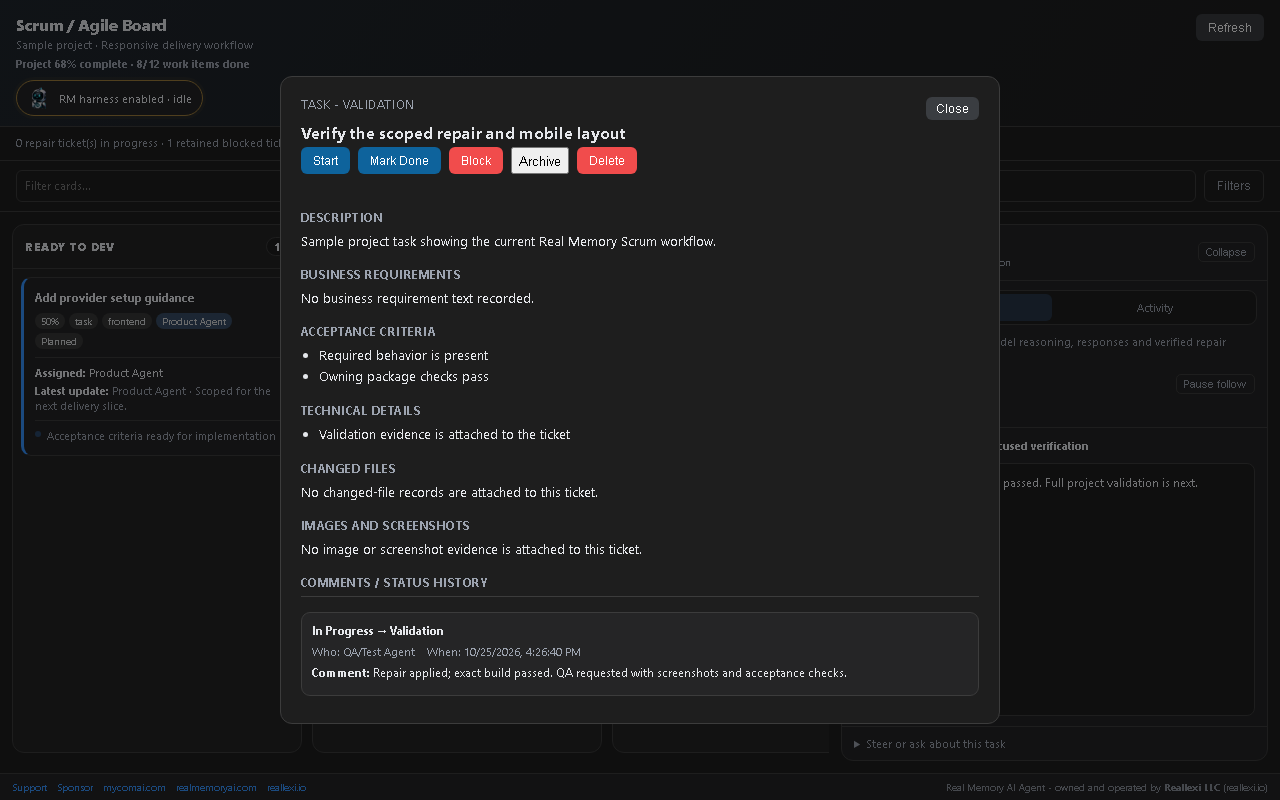
Open a card for its description, business requirements, acceptance criteria, technical notes, changed files, screenshot artifacts, and status history. Current cards show assignment and latest update; history records the actor and comment when available.
Request QA
Use Request QA to move an eligible card into the QA lane and record that acceptance checks and validation evidence are requested. A QA request is not proof that a test started or passed. The Validator must run the checks and attach the result.
When a repair is done
The harness should rerun the exact failing check after a scoped repair, then the configured full validation. A changed source file alone is not a passing result. A ticket only advances when the recorded workflow evidence supports the transition.
Review evidence
Use ticket file links to inspect changed files and screenshot artifacts. The final response should say what was changed and which checks passed, failed, or remain blocked. For repair history and selected-model waiting, see Reliable repairs and work history.
Continue or stop an owned ticket
Continue restores the saved roadmap and ticket IDs. Cancel in chat and Stop on the board wait for owned work to finish cancelling. A ticket reaches Done after its owned checks pass against current source.